
HP 3600 PCL XL error – IllegalTag

We started with print server migration from Windows Server 2003 to Windows Server 2008 R2. This huge upgrade could give us possible x64 driver issues as Windows Server 2008 R2 is 64-bit operating system.
The first printer that started to gave me headaches was HP Color LaserJet 3600n with its “IllegalTag” error. The only available driver for this printer is HP CLJ 3600 Host based driver that could have problems if your printer is installed via TCP-IP port as it is in our case.
I have installed x64 and x86 version of HP Color LaserJet 3600 and when I tried to print a test page I got following error message:
PCL XL error
Subsystem: KERNELE
Error: IllegalTag
Operator: OpenDataSource
Position: 2
I have also received this error several time on the print server:
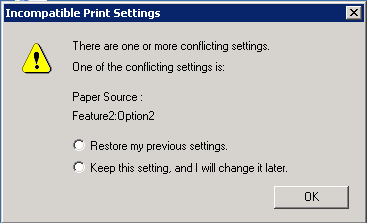
Incompatible Print Settings
There are one or more conflicting settings. One of the conflicting settings is:
Paper Source:
Feature2:Option2
Restore my previous settings.
Keep this setting, and I will change it later.
I think that this second error message is partially related to wrong print driver as I’ve tried to use HP Universal Print Driver instead of HP 3600 driver. No matter that I’ve changed the driver I’ve received this error during printer installation on my Windows 7 x64 machine.
Solution:
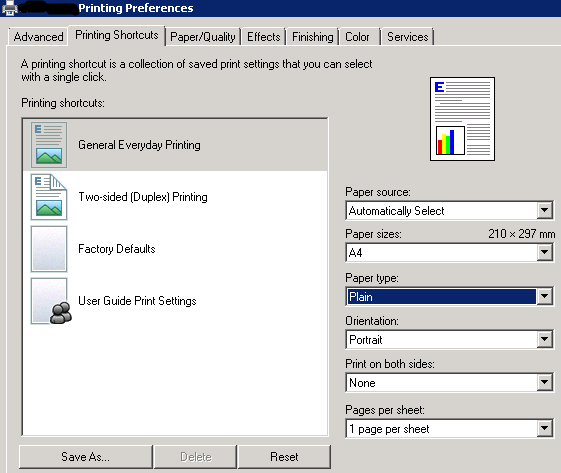
I have checked the Printing Preferences page and by default ‘Paper Source’ box was empty. I have selected ‘Plain’ option for paper source and PCL error IllegalTag message disappeared.
Comments are welcome!













thanks for the solution, it worked for us
This post has saved me a headache. Works brilliantly. Works for Server 2003R2 as well. XP Clients.
Hell, many thanks for providing this. 2 Days of research and errors ended with your article. Setup was: WinXP SP3 with USB connected printer which is shared, having a Win7 32bit – client using vista drivers for HP CLJ 3600.
Thank you for this answer! Worked for a hp 3600 issue that I was having.
So, which driver did you end up using? Did you use 64 and 32-bit? We have 64 bit 2008 R2 servers, but windows xp clients, so we need both drivers to work.
That took care of it!
Thank you very much.
Awesome! Works for Vista too, I think if its installed TCP/IP for any Windows OS, this fix works… totally weird. Gotta wonder why.
I have selected ‘Plain’ option for paper source and PCL error message disappeared. using HB version
61.82.61.41
Thanks
Thank you!!!
I set this setting on the server and fixed it.
Users have to fix the setting on their machines individually.
Is there a way fix this one place and it apply to all users?
Thanks again, very helpful!!
Scott
This is the solution! Unbelievable…
Worked for me, thank you so much!