


Gideon
-
Posts
13 -
Joined
-
Last visited
Content Type
Profiles
Forums
Events
Posts posted by Gideon
-
-
Hi, Trying for a couple of days now to download this file (.Net 4.5.1 addon) but all I'm getting is 'Public file Busy'. Any suggestions? Do I have to become a premium member on that hosting site?
Regards, Gideon.
-
Looks like AbandonWare, Not a priority for the creator and maintainer. I direct anyone who's interested to the Addon by abbodi1406. It's a WA file, very much up to date and works flawlessly.
-
OK Mooms, Thanks. My previous experiences with Add-ons was with .CAB files being added on the 'updates & languages' tab.
Working with the .WA file now and it looks good. Thanks again for the quick reply, Gideon.
-
Perhaps I'm a little thick but what is a 'WA' file? I downloaded one of the files and It does not show up for me in Win Toolkit.
What am I missing here? Best regards, Gideon.
-
Hi, I downloaded the latest .NET Framework 4.5 by Reaper dating Feb. 2013 and the following updates are not inluded in the Addon and are requested by Win7:
NDP45-kb2804582
NDP45-kb2805221
NDP45-kb2805226
NDP45-kb2833957
NDP45-kb2840642
Will the Addon be updated to reflect the latest patches?
Thanks, Gideon.
-
Thanks for your help, splinterededge.
"Ingegrating it from the silent installers" was the the key to getting this going.
It wasn't just .net framework 4.5, I just gave this as an example. All the exe's (with the exception of IE10 for Win7) would not integrate through the 'Updates + Languages'.
Using the silent installers I was able to integrate everything I needed.
Thanks a lot, Gideon.
-
Thanks, bphlpt. You da man.
-
Hi all, I see a lot of posts with this word preceding the title: [sOLVED]. How do I add [sOLVED] to the title of my posts?
Thanks, Gideon.
-
Hi all, Using the stable version of Win Toolkit (1.4.0.77) and also the latest version (1.4.1.21) I can't load any executables into the tool, using the All-in-one Integrator (Updates and Languages).
.Net framework 4.5 or kb890830 are just 2 examples. The only one that loads OK is IE 10 for Win 7.
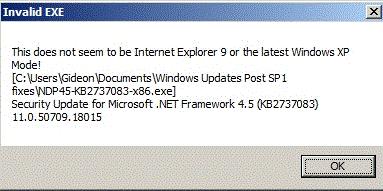
Error message is: This does not seem to be Internet Explorer 9 or the latest Windows XP mode.
(Screen capture attached).
I'm stumped, Any ideas?

-
Greetz X23, just saw this post. Still interested in a solution?
-
So how do I delete my own posts?
-
This to inform the 2 posters preceding this one that the latest .NET Framework AIO is available from the same author at Ryanvm.net
http://www.ryanvm.net/forum/viewforum.php?f=7
It's about the 8th item from the top. As of today, the latest is 11/27/2012.
Microsoft .NET Framework 4.8 for Windows 7
in Win Toolkit Addons
Posted
Thanks for the quick reply bphlpt. I updated my IE browser to the latest version and now it's working fine for me.
Regards and thanks again.