Jump to content
View in the app

A better way to browse. Learn more.

WinCert.net Forums

A full-screen app on your home screen with push notifications, badges and more.

To install this app on iOS and iPadOS
  1. Tap the Share icon in Safari
  2. Scroll the menu and tap Add to Home Screen.
  3. Tap Add in the top-right corner.
To install this app on Android
  1. Tap the 3-dot menu (⋮) in the top-right corner of the browser.
  2. Tap Add to Home screen or Install app.
  3. Confirm by tapping Install.
  • Search By Tags

    Search will match any tag entered
  • Search By Author

Content Type

Forums

  • General
    • General Discussion
  • WinCert Member Projects
    • Win Toolkit
    • HeiDoc.net Projects
    • Windows Post-Install Wizard (WPI)
  • WinCert.net International
    • WinCert.net Turkish
    • WinCert.net Italian
    • WinCert.net French
    • WinCert.net Spanish
    • WinCert.net Dutch
  • Microsoft Operating Systems and Software
    • Microsoft Windows
    • Microsoft Windows Server Family
    • Microsoft Office
    • Tips and Tricks
  • News, Support, Discussion
    • Software Field
    • Hardware Field
    • Networks and Security Field
    • Games Hangout
    • Scripting and Programming
  • The Design Art Forum
    • Graphics Showcase
    • Windows Customization
    • Web Design/Hosting/Administering

Calendars

  • Community Calendar

Find results in

Find results that contain...

Date Created

  • Start

    End

Last Updated

  • Start

    End


Filter by number of...

  • Minimum number of comments

  • Minimum number of replies

  • Minimum number of reviews

  • Minimum number of views

Found 5 results

  1. Hi, I'm trying to use the contents of an unzipped windows 10 iso to upgrade windows 10 from an early version to a later version (there isn't enough room on the tablet to allow the update to download in the traditional way) All has gone well so far, except the 'English' version of the iso I have downloaded claims to not match the County region English Languages English (United Kingdom) installation I have Which version of the ISO should I have dowloaded please? As the version down't match I'm not given the iopportunity to keep apps and settings Many thanks in advance, Gideon
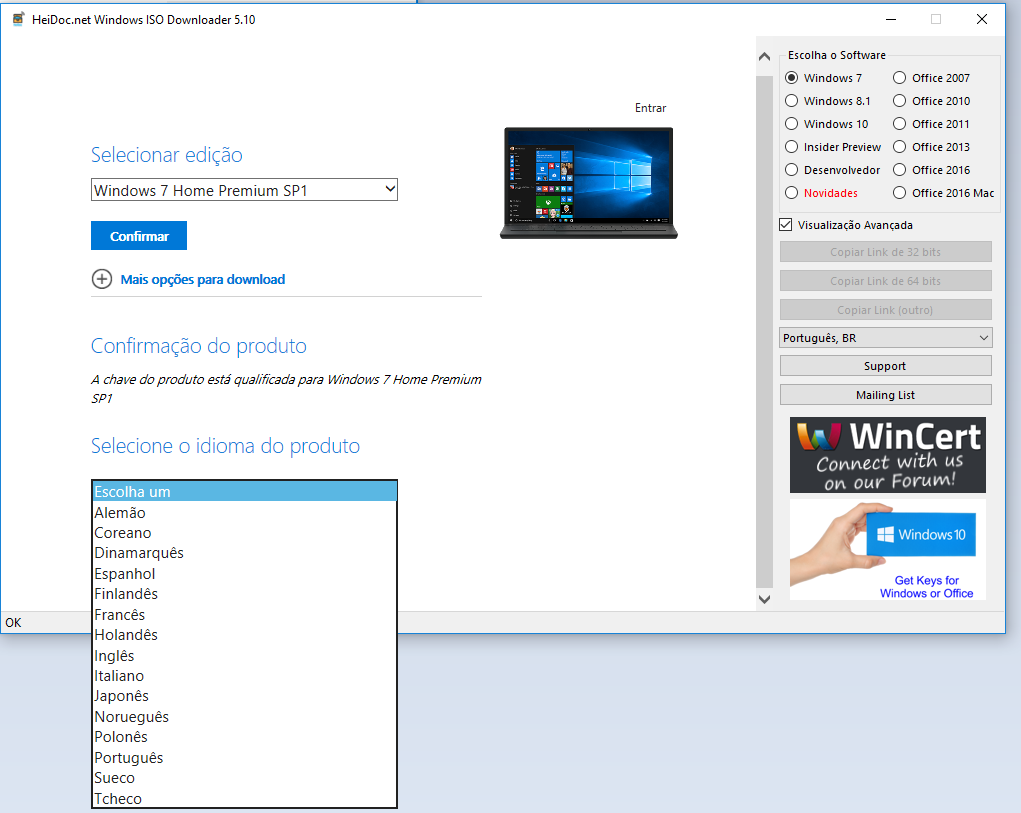
  2. I need the Windows 7 ISO Portuguese Brazilian (pt-br) language but is not listed on selection box. Please see the print below: That Portuguese version is from Portugal but I'm from Brazil. What can I do?
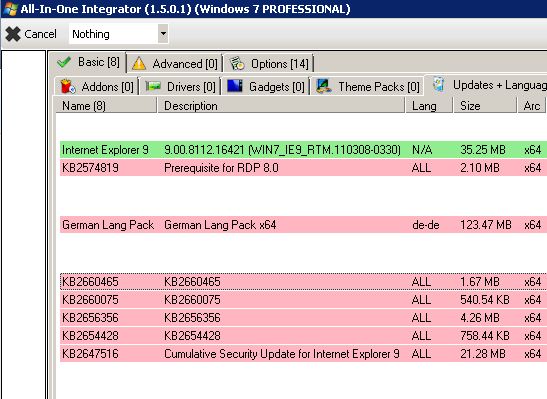
  3. Hi All, I try to create an English iso file with my German Windows7_x64 OS Development-PC. The English isofile I used is X17-59186.iso (Win7 SP1 X64 EN). If AIO from WTK 1.5.0.1_Test38 is processing the updates, IE9 (982861) is marked green but all the others (incl. language pack german) are marked red. Did I forget to set a special checkmark somewhere? Is there a log file I could check for getting further information about the problem? Thank you very much and hav a great weekend. Sputnik089
  4. hello, i looked around and i didnt found a topic about it but is there a way to change windows 7 setup language i already downloaded a language pack and put it in for silent install thank you in advance, Ramon
  5. Hello, How to change language in Windows 7 Toolkit ? How to translate in French by example ? Thansks for the answers.


Account

Navigation

Search

Configure browser push notifications

Chrome (Android)
  1. Tap the lock icon next to the address bar.
  2. Tap Permissions → Notifications.
  3. Adjust your preference.
Chrome (Desktop)
  1. Click the padlock icon in the address bar.
  2. Select Site settings.
  3. Find Notifications and adjust your preference.