Search the Community
Showing results for tags 'Multiple Languages'.
Found 2 results
-
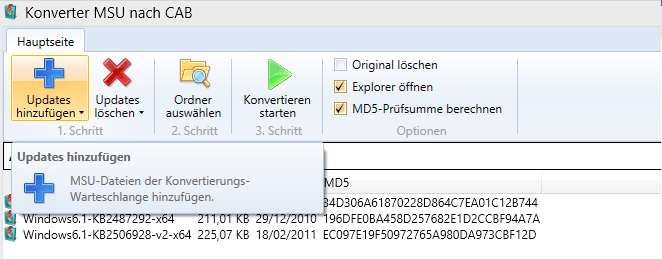
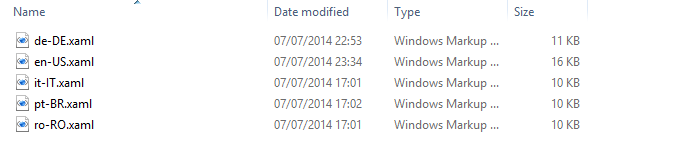
After many years of users requesting that Win Toolkit to be available in multiple languages has finally be done in v2! You can now have the tool in your own language. Note 1: As of v2.0.0.10, everything can be translated. Please let me know if I've missed something important. Note 2: If a translation is not available for a certain control. English will be displayed by default for that control. Sharing You don't have to put please share your language file with other by posting it in here. Language Detected What the title bar looks like when a language file has been detected. In this case, German. MSU to CAB Converter How the MSU to CAB Converter looks like when translated. Language folder 'Lang' folder structure. Creating a language file In the lang folder you will see an en-US.xaml which is ALWAYS up-to-date. If you want to translate Win toolkit into your language, just copy and paste than file. Once copied, rename it to your language code such as de-DE.xaml for German, ro-RO.xaml for Romanian, and so on.. Open the newly copied xaml file in notepad You should see: Change the text in highlighted in bold above into your language and save. Next time you open WinToolkit.exe, you should see the german text. You will also see 'de-De' on the main title bar. What the title bar looks like when a language file has been detected. In this case, German. Updating a language file Since the en-US.xaml is always up-to-date. You can literally just copy and paste the missing lines into your current file. Once done, just translate those lines.

-
For v1.4.0 i was planning on adding alot more component removals for W7T (like vLite) but many people have been wanting multiple languages for a while. Do you want me to skip straight to v1.4.0 or would you want me to do a v1.3.5 with multiple languages first? It's either one of the other but they will both get done. I just need to know which to focus on. EDIT: Better component removal (33 votes [76.74%]) Multiple language support(10 votes [23.26%])