_14e30a.png)
_8126ce.png)

geodasoft
Contributors
-
Joined
-
Last visited
Everything posted by geodasoft
-
podrias Actualizar por favor
-
Microsoft Visual C++ 2015-2019 Redistributable 14.26.28720.3 update
-
AIMP v4.60, build 2180 (25.03.2020) Fixed: sound engine - replaygain - cache was not reset before new analysis that leads to less accurate calculation results in certain cases Fixed: player - values of sound output settings in the drop-down lists displays twice Fixed: tags - ID3v2 - player detects ANSI encoding incorrectly for words with letters from different languages
-
actualizaciones silensiosas
-
Microsoft Visual C++ 2015-2019 Redistributable - 14.26.28619.0 update
-
Changes in 200317 (1.7.21146): Added the ability to copy the path of the selected items to the playlist Added the ability to move items to playlist Added the ability to open the preferred language only in subtitle download Fixed a problem where installation started slowly or freezed on certain PCs Fixed an issue that certain WEBDAV servers cannot be connected Fixed an issue that cannot list files on certain FTP servers Fixed an issue that caused errors when opening certain PNG files Fixed a problem where navigation bar thumbnails were incorrect in certain MKVs Fixed a problem that certain Blu-ray subtitles did not come out Improved lyrics comprehension built into MP3
-
* V 2.3.51.5315 (2020/03/17) [Improvement of function] - Improved UI of Advanced Screenshot popup. [VOC and bug fixes] - Fixed scrolling error in preferences default mode. - Fixed an error that had occurred in the screenshot folder when using the function of "Burst Capture". * V 2.3.50.5314 (2020/02/24) [Improvement of function] - Added a shortcut key and Move player window feature (Shift + Alt +Arrow Keys) - Improved a preview of preferences message (Reflected the font and font size immediately) [VOC and bug fixes] - Fixed the error that you were not able to turn on hardware acceleration. - Added a function of editing the playlist name. - Fixed the problem that loading screen didn't show in some environment. - Fixed the problem that you were not able to pause a video when clicking the taskbar icon to minimize your playback window. - Fixed the problem that the preferences window in default mode was not able to reflect DPI for each monitor.
-
AIMP v4.60, build 2177 (24.02.2020) Fixed: general - an issues with the "image/jpg" MIME-type interpretation (regression)
-
3.8.4.4 - 22/02/2020 Here's an update that will allow a track entry to have its filename changed to the same as in an old removed/unreferenced entry: It will always initially keep the renamed entry's existing info (the old info is lost) and then rescan the file. Not tested much yet, so please report any problems with it.
-
AIMP v4.60, build 2176 (21.02.2020):
-
AIMP v4.60, build 2175 (20.02.2020) Common: localizations has been updated Fixed: audio converter - OGG Vorbis - fractional quality values are not available to select (regression) Fixed: album arts - caching does not work (regression) Fixed: album arts - GIF files does not displayed in the "File Information" dialog minor issues were fixed
-
GOM Audio 2.2.25.0 update
-
 Image Tuner v8.x [Desatendido][Cambia el Tamaño de Fotos] Image Tuner is a free batch image resizing, renaming, conversion and watermarking software with a super-intuitive and straightforward interface. Based on an extremely fast image processing engine, this award-winning software has a bare minimum of controls and will help you with the most typical photo and image-related tasks. Resize your photos in batch mode using built-in templates Rename multiple pictures in batch mode Add your logo or other watermark to multiple photos at once Convert between image formats using various settings Flip, rotate, sharp, colorize, round your photos Remove EXIF and other info from digital pictures Support Windows XP, Vista, 7, 8, 8.1, 10 (32 and 64 bit)
 -
 Notepad++ is a free (as in “free speech” and also as in “free beer”) source code editor and Notepad replacement that supports several languages. Running in the MS Windows environment, its use is governed by GNU General Public License. Based on the powerful editing component Scintilla, Notepad++ is written in C++ and uses pure Win32 API and STL which ensures a higher execution speed and smaller program size. By optimizing as many routines as possible without losing user friendliness, Notepad++ is trying to reduce the world carbon dioxide emissions. When using less CPU power, the PC can throttle down and reduce power consumption, resulting in a greener environment. Included plugins: . NppExport vv0.4 (32 bits x86 solamente) 2. Convertidor 4.4 3. Herramienta Mime 2.1 4. DSpellCheck 1.3.5 5.-Mime Tool 2.8 6.- WinGup (for Notepad++) v5.1.1 7.- Scintilla v5.4.1 8.- Lexilla v 5.3.0.
 -
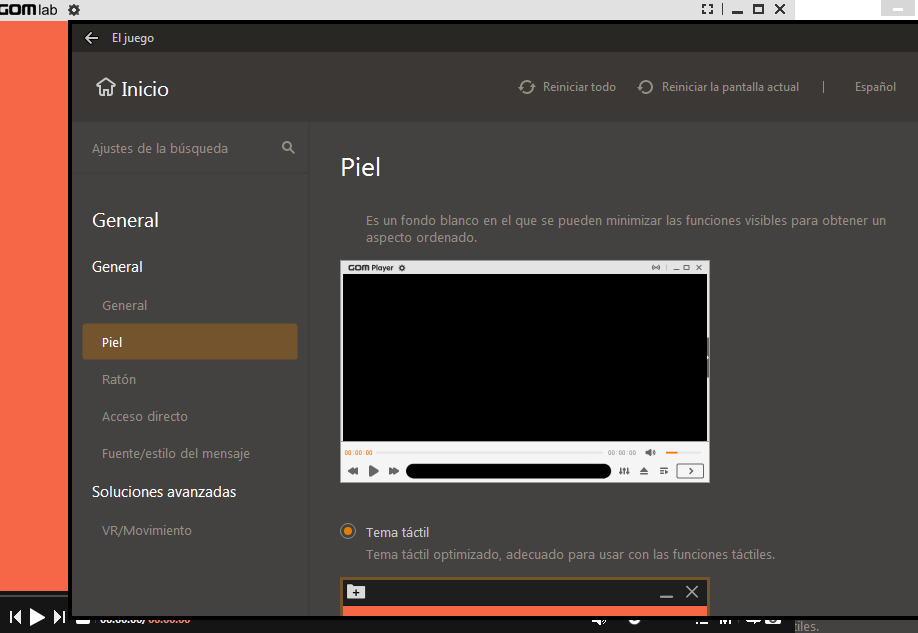
* V 2.3.50.5313 (2020/02/18) [Improvement of function] - Added a shortcut key and Move player window feature (Shift + Alt +Arrow Keys) - Improved a preview of preferences message (Reflected the font and font size immediately) [VOC and bug fixes] - Fixed the error that you were not able to turn on hardware acceleration. - Added a function of editing the playlist name. - Fixed the problem that loading screen didn't show in some environment. - Fixed the problem that you were not able to pause a video when clicking the taskbar icon to minimize your playback window. - Fixed the problem that the preferences window in default mode was not able to reflect DPI for each monitor. Nota es la ultima version que subo de estepograma tiene mucha publicidad y no deja poner skins
-
Format Factory 5.0.1 Update
-
Historial de versiones | ver 1.75 [2020-02-09] : - Triple clicking now selects the whole line - Open dialog now shows all file types by default - Recent files list now shows 10 files instead of 6 by default - Bugfix: opening a new file with the same contents as the currently open did not scroll the text to the top - Minor tweaks and fixes
-
Changes in 200206 (1.7.21126): *Not yet available*
-
Changes in 200205 (1.7.21125): *Not yet available*
-
Changes in 200204 (1.7.21124): Added search feature into preferences Added the ability not to load embedded subtitles Fixed an error when accessing a specific webdav server Fixed an issue where external bookmarks were deleted when you closed playback Improved slideshow output Fixed a problem that certain PCs started playing slowly Fixed a problem where fonts were displayed differently on certain PCs Fixed an issue that caused pink to appear when using the exclusive overlay mixer Fixed a problem that can't play files on certain FTP servers
-
Notepad++ 7.8.4 release note: https://notepad-plus-plus.org/news/v784-released/ Notepad++ 7.8.4 change log: Fix regression of double clicking a found in files result while Word-Wrap is on. Fix HashFromDlg title bar localization issue.
-
Improved telemetry We are constantly looking for ways to improve the quality of our product. To that end we are adding additional "opt-in" telemetry reports for users who choose this option: "Tools>> Options>>Advanced>>Tick "Help improve Skype..." The reports may contain your Skype ID and or Microsoft Account ID but we will not use it to identify or contact you. What's New: Improved chat experience For the last year we’ve dedicated a lot of time to refresh the chat experience in Skype. We’ve brought more improvements to the desktop. Photos in your new Skype for Windows and Mac apps show up as you’d expect, beautifully displayed for your instant viewing. On Windows, there’s more spacing between contacts and chats, as well as message previews for unread chats, making it even easier to follow conversations. Chat and call simultaneously with one click People love multi-tasking. Many of you already exchange IMs while on a live call today. With the new side-by-side design, you can effortlessly multi-task on a voice or video call. On Mac, it only takes one click. Share messages, photos or files for a more active conversation together, without ever leaving your call. Free group video calls Skype loves bringing groups together—so, last but not least, the free group video calls we previously announced work better than ever on the redesigned Skype for Mac and Windows.
-
-
* V 2.3.49.5312 (2020/01/28) [Improvement of function] Added Default Mode Preferences Settings - Feature of Preferences Search - Feature of Initializing Preferences Page Individually - Able to Split Preferences of Style of 2nd Subtitle
-
if possible install because the missing version will only install