_14e30a.png)
_8126ce.png)


NIM
Administrator
-
Joined
-
Last visited
Everything posted by NIM
-
I would like to see it since I'm planing to get myself a pocket PC in the near future.. :thumbsup: So, show them Cygnus
-
you should behave for your age you dirty boy :lol:
-
Ooooo, do I know you from somewhere Welcome mate!
-
Prove it dirtwarrior :naughty: Although I know you did it :clap:
-
Preety much in the same way.. Open your registry and find or create the key below. System Key: [HKEY_LOCAL_MACHINE\SOFTWARE\Microsoft\Windows NT\CurrentVersion\Winlogon\ SpecialAccounts\UserList] Value Name: Administrator Data Type: REG_DWORD (DWORD Value) Value Data: (1 = show Administrator) Create a new DWORD value, or modify the existing value, called "Administrator" and set it according to the value data above. Exit your registry, you may need to restart or log out of Windows for the change to take effect. Note: This tweak will not work if you have renamed the Administrator account.
-
Go to: Start > Run = " control userpasswords2 " select administrator account, click reset password (input new pass) / Click Ok Open Registry editor and create this key: HKEY_LOCAL_MACHINE\SOFTWARE\Microsoft\Windows NT\CurrentVersion\Winlogon\SpecialAccounts\UserList Create "DWORD (32bit) Value" Value Name: Administrator Value Data: 1 or -Right Click Computer Icon Select Manage -Expand The Local User And Groups -Rename the administartor account to match the name in the reg file, you can also just leave the name the same for the admin, but the name must match the reg file. This is a easier a way, change the "PLACE_NEW_NAME_OR_ADMINISTARTOR_NAME_HERE" to the name you want. Save As AddAdmin.Reg Windows Registry Editor Version 5.00 [HKEY_LOCAL_MACHINE\SOFTWARE\Microsoft\Windows NT\CurrentVersion\Winlogon\SpecialAccounts\UserList] "HelpAssistant"=dword:00000000 "TsInternetUser"=dword:00000000 "SQLAgentCmdExec"=dword:00000000 "NetShowServices"=dword:00000000 "IWAM_"=dword:00010000 "IUSR_"=dword:00010000 "VUSR_"=dword:00010000 "PLACE_NEW_NAME_OR_ADMINISTARTOR_NAME_HERE"=dword:00000001
-
Hold down CTRL button and use your mouse scroll wheel to adjust the size.
-
Open new text document and enter this lines: Save it with .reg extension, run it and reboot..
-
If you want to open command window while browsing Vista Windows Explorer to avoid "cd" commands in it do the following.. Right-click on any folder in Vista Explorer while holding down the shift key. A context menu will open with two new options: "Open Command Window Here" and "Copy as Path" Other option will copy current path to clipboard..
-
Solved: You need to subscribe to feeds in IE and then they will be shown/selectable in Vista Sidebar..
-
Yup, I agree with you, I also think it's Alexander the Great..
-
Think it's not Doom, I'll wait for another hint :sweatingbullets:
-
Hmm, this will be hard, I can only suppose that it's a horror, other than that, nothing
-
Since Helt didn't post a new question, who'll do it instead of him, com' on lads
-
Here you can find a list of some useful registry tweaks in Vista..
-
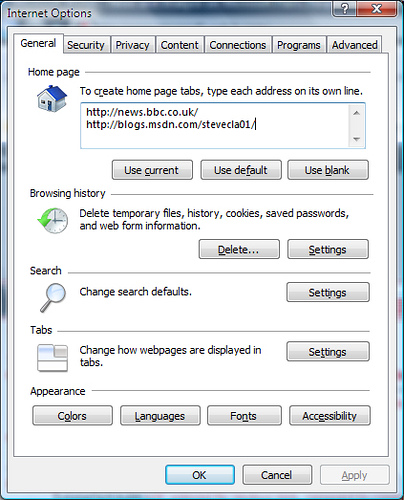
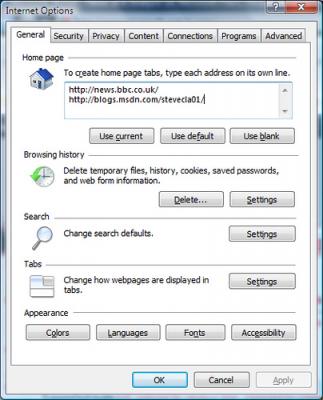
How to open multiple homepages when you start IE7 now that we've got tabbed browsing. It took me a little while to figure this when I first used IE7 but now I couldn't live without it as a useful start to the day. Rather than try to explain it. I just took a screenshot of my config which should explain everything. I'd highly reccommend adding that second URL as one of your daily visits of course :thumbsup: Courtesy: Steve Clayton Blog
-
-
Has anyone managed to change the RSS you want to watch in Vista sidebar. I can only see Microsoft Feeds. I hope it is or will be possible in final version, and if not :sigh:
-
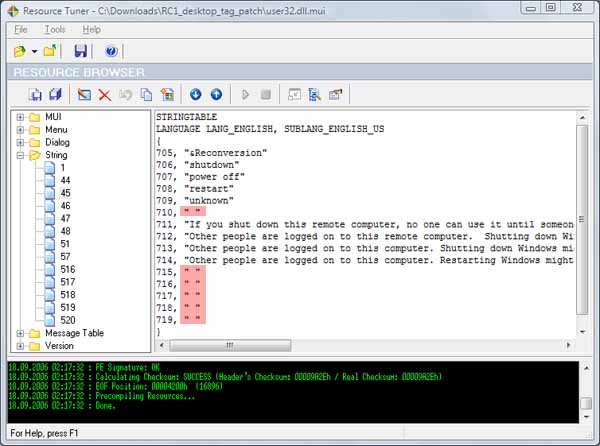
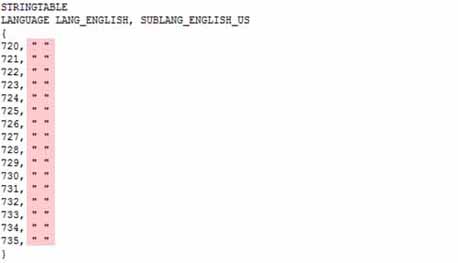
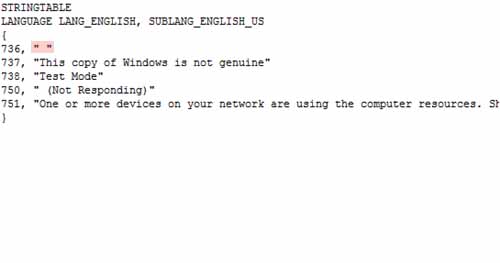
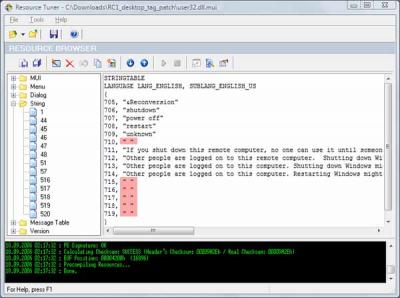
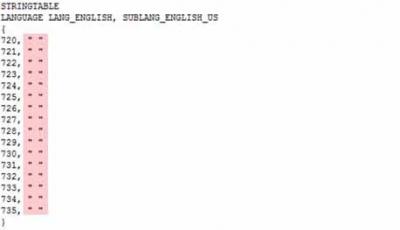
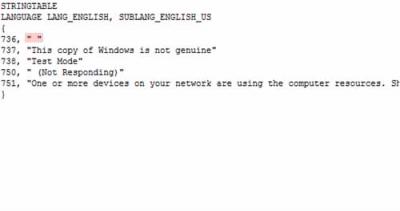
The RC1 watermark in the right corner is set by user32.dll.mui. The user32.dll.mui file is situated in your '\Windows\System32\xy-XY' folder (accordingly to your installed language): on english based systems in 'en-US', german = 'de-DE' [, ...]. Here are 2 solutions to stop this Watermark being displayed: I.) Modify user32.dll.mui by yourself (for instance with ResourceTuner or similar programs) or II.) Replace original user32.dll.mui with a patched one

-
Correct! :w00t: ! LOL @ wolf! , your turn Helt..
-
-
-
-
Yup, correct, it's getting harder :naughty: your turn now... :sweatingbullets:
-
LOL, k, guess this..