


Sull
-
Posts
351 -
Joined
-
Last visited
Content Type
Profiles
Forums
Events
Posts posted by Sull
-
-
I like how WinCert for looks now, though the FAST REPLY, REPORT and QUOTE buttons are a little bright, I find my eyes get drawn to them.
-
Generally people like to use more than one spyware program, can you guys recommend me two programs.
I am already using spybot search and destroy, what would be another good one.
I do not want one which is always running with Windows.
-
rick,
Yes I have .NET Framework 3.0 Service Pack 1
-
ok rick.
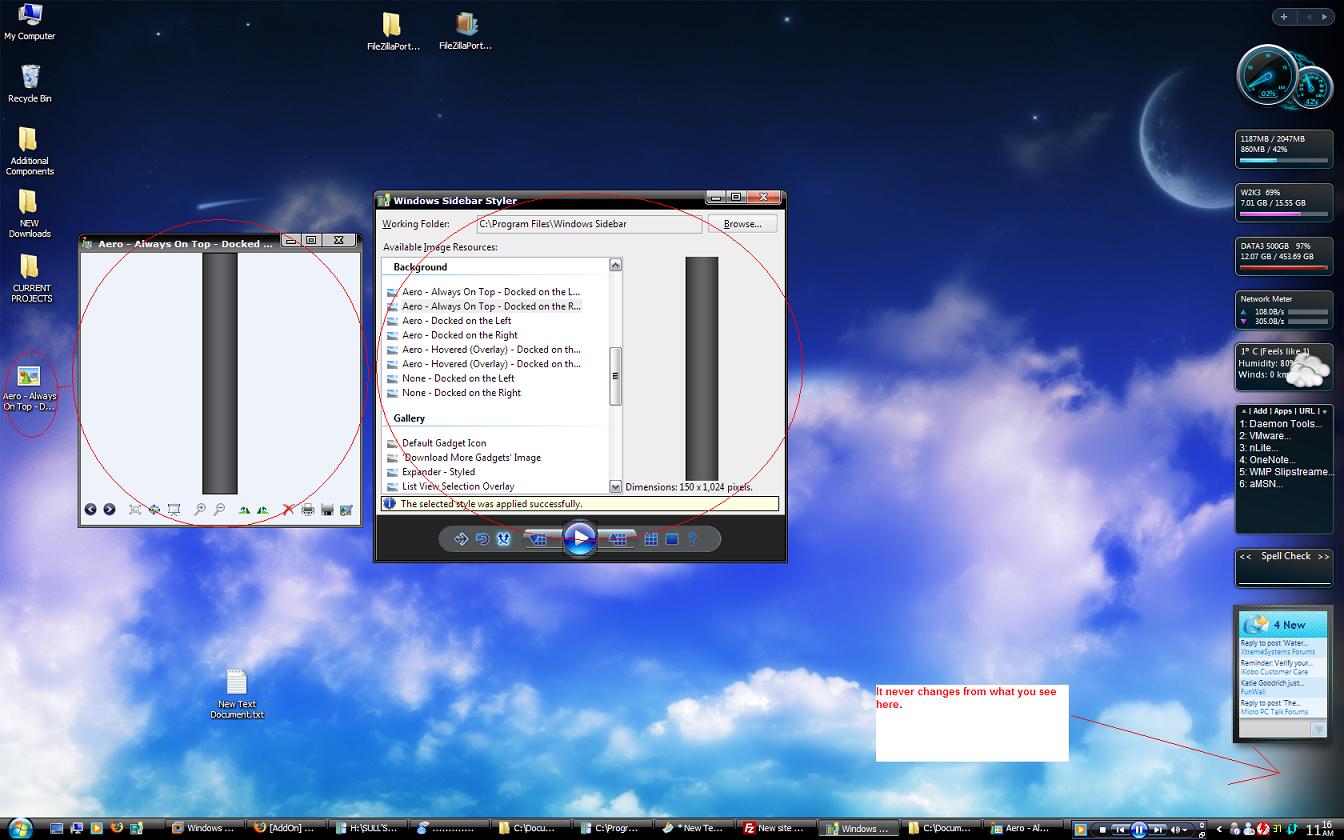
So I am trying some of the styles posted here, format is .wsstyles, I double click any of them and they pop up in the styler I them apply it but nothing changes, I then save the .png and change to it in styler and still nothing.
I also get the a message saying "the selected style was applied successfully"

Is it not working or am I missing something here ?
Thanks
-
Hey rick,
I use the styler to apply a new theme but my sidebar does not seem to change, I tried exiting it and still looks same as default.
Maybe you have some idea
-
Yup the hyperlink text looks good.
N1K,
I forgot you already gave me the info and that, I am just waiting to confirm my credit card then the money will be sent.
-
Hey N1K,
I did not see this post, I am still willing to donate, in the next day or so I will check out that site ok
Please PM me any info I need to send the money.
:heart: WinCert :heart:
EDIT:
N1K,
I just need to verify my account and the money will be sent, hang tight.
-
Well thanks tips !!!
I want to accomplish this unattended meaning after Windows XP has finished installing I will see Windows Live in the left side of the start menu and it is set as my default mail application.
EDIT:
I would also like to add I have done reg shots, compared them and added entries to my unattended setup but they make no change.
-
Cool Scrat, can you post that wall please
Here is mine, not much changed since last month.
-
Alright awesome, well you know my MicroPC uses ntoskrnl.exe so we will find out if all is good tonight.
I will post my results
EDIT:
Working perfectly now thanks
-
I want to change the icons on the left side of the start menu, currently I have outlook and firefox but I want to change outlook to Windows Live Mail, how can this be accomplished in a unattended setup ?
Also need to set Windows Live mail as default unattended ?
Thanks
EDIT:
I have figured it out, thanks to ricktendo64
-
dareckibmw,
It is probably because those computers do not use ntoskrnl.exe that would be why you don't have an issue.
hngovr1,
Thanks man, curious what was the problem ?
-
Just thought I would let you know ntoskrnl.exe is corrupt in 5508.
-
I also tried the one by hngovr1 with the same issue, that is probably what you used ?
For editing my own, all I have to do is switch the bitmaps in res hack ?
Also in res hack I never can fine the green bar ?
thanks
-
Right gotcha, must have missed that
Thank you
UberPack rocks !!!
-
Elllo mate,
I was wondering if it is possible to save the settings for MMM to place into a unattended setup ?
Thank you ...mate.
-
orbit,
In VMWARE everything is fine but once I try to install on my MicroPC, I get ntoskrnl.exe is missing or corrupt, it is not missing so I imagine corrupt ?
this happened with two of your addons the blue and the blue XP pro, I removed your addon and everything went fine.
Thanks
-
The XP Pro one looks very nice, is it possible to have it a little more centered ?
-
amnesia,
My OEM logo does not show up in computer properties ( sysdm ) is this because I patched using the one you posted ?
-
Thats weird I didn't seem to get a email saying someone replied, maybe I missed it.
I would like the logo in the bottom right hand corner of the screen, pretty much right in the corner
-
Just so everyone knows, this program can break things in Windows, test in VMWARE first.
Vinbuntu,
Your computer will use 1 of these 4 files for bootscreen, ntkrnlmp.exe, ntkrnlpa.exe, ntkrpamp.exe and ntoskrnl.exe.
What kind of boot screen are you looking for ?
-
Here try this, I would like a similar one which says UX Edition but I don't have...
I also don't know what kind of format you need ?
here is a pic
-
I found a logo but its not the one I want, can you just add text in the bottom right hand corner of the screen saying UX Edition, something sweet looking. If you need an actual image I can probably make one
-
Question for you orbit,
Is it possible to make my boot screen say Sony UX Edition in one of the corners, I think I may have a logo..
If possible, I know you are limited to 16 colour 4bit palette, could you make one for me please ?



[Desktops] April 2008
in Graphics Showcase
Posted
Looks good windowsguy..
Could you post that mario wallpaper please ?
Also in screen2.jpg is that a Vista style not Windows Blinds ?