_14e30a.png)
_8126ce.png)
ricktendo
Members
-
Joined
-
Last visited
Everything posted by ricktendo
-
OK ill make all if Kelso doesn't make em first, gimme a few days EDIT: I get a 404 file not found on the Opulence WB
-
OpusOS... http://www.ryanvm.net/forum/viewtopic.php?t=1797 The rest you gotta gimme a few days
-
Updated theme v3.2
-
I got this startup sound from Cygnus (the reason you cant find it in Media is its located in a DLL, I forgot the filename)
-
WolfX2 will def know this one
-
Here are some that I have alredy done with the Anti-Aliased Shadowed Cursors... user32_Cursor.rar Go to system32 and copy user32.dll to someplace on your desktop Open it in reshacker Go to Action then Update all Resources Browse to user32_Cursor.res and hit OK Then CTRL+S (Save) Use Replacer to replace in system32 and Voil
-
Its not done in the registry, but in a DLL Use a reshacker and replace the cursors in user32.dll with a set of non animated curs
-
Hey glenis check this out... vLite (its nLite for Vista)You can remove a whole bunch of crap from your DVD... Enough to make it fit onto a regular 700 Meg CD
-
Updated v1.0.11 Final
-
Now right click on it and make sure that vsp.exe is in the same folder as the inf and select install... it should copy it to system32 and add the refistry entries for it
-
Updated... for default install
-
Let me update it
-
Make a NEW folder and then highlight all the windows CD rom or DVD files and copy them to it Name the foleder C:\XPCD or C:\VISTADVD and browse to it with nLite or vLite and begin customizing
-
You need XP, 2000 or 2k3 There is a VLite for Vista
-
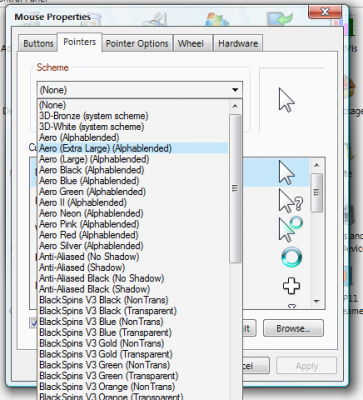
Vista RTM Aero Cursors for XP Comes in Normal, Large and Extra Large sizes Ricks_VistaRTMAeroCursors_AddOn.rar MD5: 8038ADA5BF73820BC7E84607EA73E9B5 Size: 93.7 KB
-
I started a new topic for ya... Here are some links for ya: http://www.msfn.org/board/index.php?showtopic=28005 http://www.ryanvm.net/msfn/nlite.html
-
WOW cool watch
-
Yea my PC is VERY Slow now :lol:
-
DA: http://www.deviantart.com/deviation/50984322/
-
-
Added v5.50
-
-
Feel free to post your finished addons for testing
-
-
Does not load on startup No sidebar and Icons (only the Toolbar Icons that come with the themes) Its Enhanced version not trial...