Windows 8 won’t go to sleep
I have noticed that my Windows 8 system won’t go to sleep automatically even though the sleep function was working normally with Windows 7.
I am using Asus P8Z77-V LE Plus with Intel i5 3450 CPU on Ivy Bridge with the latest version of MBO BIOS that has improved compatibility with Windows 8.
powercfg /a command gave the result that Standby (S3) is available on my system.
Standby (S3) is the new standard that Windows 8 uses, unlike Windows 7 that used (S1) and (S2).
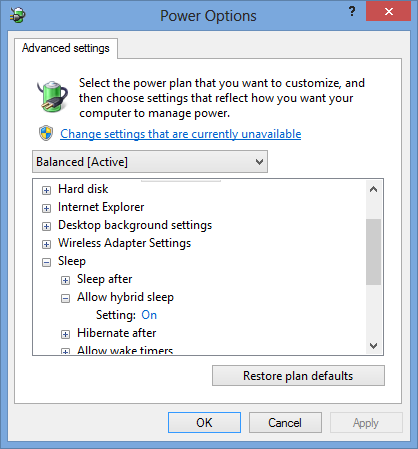
To use the (S3) Sleep feature you have to enable Hybrid Sleep in power options as in the picture below (should be enabled by default):
When I tried to enter the sleep manually Win+I | Power | Sleep it worked. The machine is capable of sleep but it just won’t go there.
Therefore it was time for powercfg /energy command that gives you Power Efficiency Diagnostics Report in the following location:
C:\Windows\System32\energy-report.html
You won’t be able to open the report in the stated location because of the permission issues. This could be a Windows 8 bug, so you’ll just have to copy it to some other location like the Desktop.
Among other things I have noticed that first in the line was Windows Media Player Network Service that prevented the system going into sleep mode.
The program has made a request to prevent the system from automatically entering sleep.
Requesting Process \Device\HarddiskVolume4\Program Files\Windows Media Player\wmpnetwk.exe
Therefore I stopped and disabled Windows Media Player Network service because I actually don’t use it. After the restart and 30 minutes of inactivity, my system wen’t to sleep automatically.

I have also noticed couple of error entries in the Event Viewer. It is interesting that all these entries were related to manual sleep requests. I haven’t received this error code when the system entered sleep automatically.
Here’s what the log says:
The system firmware has changed the processor’s memory type range registers (MTRRs) across a sleep state transition (S4). This can result in reduced resume performance.