_14e30a.png)
_8126ce.png)


NIM
Administrator
-
Joined
-
Last visited
Everything posted by NIM
-
Once before I did just that, I have formated drive in my Macbook and installed Windows 7 from the scratch. BTW, if you ever decide to go back to MacOS, you'll be able to do that also.
-
Nice, thanks for the info 👍
-
Not that issue, but I have experienced 2 reboots in 3 days after I have upgraded to the latest v20H2 version. I've checked windows update and there was additional drivers offered in case I am having issues with the latest version. I have installed Intel - System -10/3/2016 driver and I'll see if this will help. Regarding your problem. Have you tried to login locally on those problematic machines. Just to confirm that the problem occurs only when you're logged on with Microsoft account?

-
Hi Rick, welcome back man! How're you been doing? I'm glad to see you again.
-
-
-
-
What have you used to download Windows 10 ISO?
-
Was this a problem? https://www.wincert.net/microsoft-windows/the-system-found-unathorized-changes-on-the-firmware-uefi/
-
-
We're sad to see you go. All the best, Nik
-
-
For a start I suggest you invest in SSD drive, they're cheaper than ever these days. You'll get 10x faster laptop with upgraded drive.You might also upgrade RAM, since I presume you have 1GB. After that you'll have to create a bootable USB drive to boot Windows from it.
-
-
Hmm, strange, I have downloaded the latest ADMX files available from Microsoft and still is not working as it should. I'm glad you've managed to get it to work properly. Thanks for the info.
-
In the same policy can you try to configure Computer Configuration. You should be able to do the same as you did for User Configuration. Br, Nik
-
Hi, I didn't mean about HTTPS, I just though you can try to enable the same settings as I did.
-
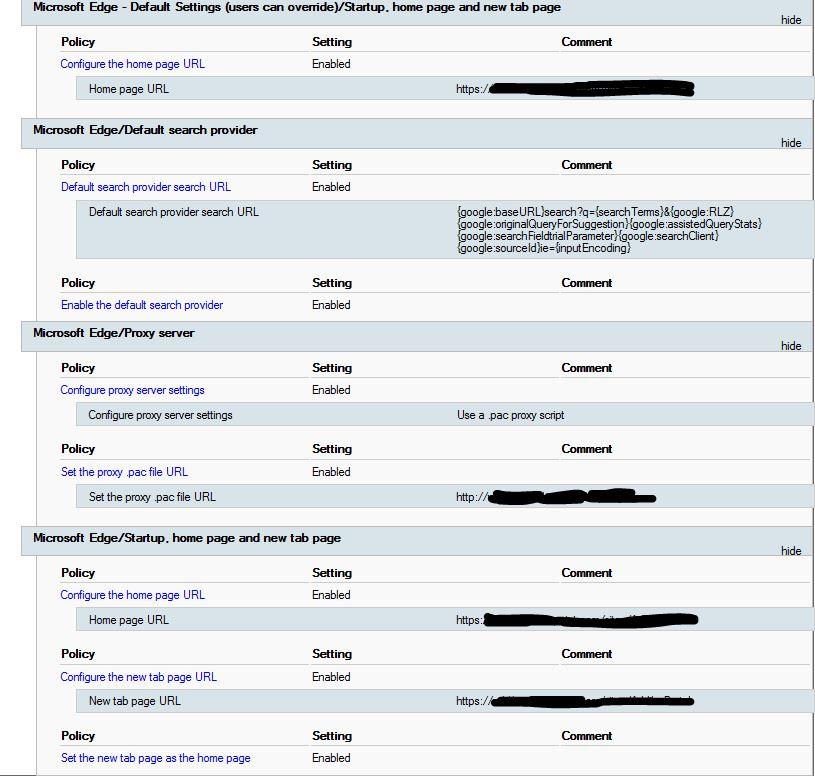
Hi Rick, here is the working policy in our environment. Try to enable settings as we did. Also, do you have any filtering in place? Can you please post gpresult /r from the client machine here? Br,

-
-
Happy New Year Snowguy. Welcome to Wincert!
-
Welcome Aeowulf! I am glad to see you here at Wincert 👍
-
Where did you get that info? We have an active discussion about this topic here:
-
hey ferigno1, welcome to the Wincert community 😀
-
Just to be clear and I'm sure you're aware of that, running Windows 7 and Windows 10 in dual boot with the same key is illegal. Since the latest Windows 10's November update (1909), Microsoft has changed its Win 10 installer to accept Windows 7 and 8, 8.1 keys. Because of this change you are allowed to do a clean boot of Windows 10 2019 November update and use your Win 7, 8 or 8.1 keys. After using the Windows 7 key, Windows 10 will report this key to Microsoft’s servers, and you'll receive a digital entitlement or digital license to continue using Windows 10 for free. With all this said, if you create a dual boot with Window 10 1909, you'll be able to use and activate it with Windows 7 key and I seriously doubt that your Windows 7 will then be deactivated, but I just can't confirm this since I haven't tried it.
-
According to Microsoft answers you'll be able to use the Win7 key even after you upgrade to Windows 10. Your Windows 7 license will always be valid and will not be changed or deactivated because of the upgrade to Windows 10: you'll be able to install or restore Windows 7 again in case you'll need to do that (provided that you've the Windows 7 installation DVD) https://answers.microsoft.com/en-us/insider/forum/insider_wintp-insider_update/windows-10-insider-update/106f3930-d92c-4e58-97be-ed8a7228b3c6 Br, Nik