
_14e30a.png)
_8126ce.png)

mooms
Global Mods
-
Joined
-
Last visited
Everything posted by mooms
-
https://www.ccleaner.com/docs/ccleaner/advanced-usage/command-line-parameters CCleaner needs to be installed with the correct locale ID value (1036 for French), the command line used in the maker works even at T-13 on Windows XP, so I have no idea why it is not working on Windows 10. A quick fix that should works: Open the file ccleaner.cfg in the bin folder, and replace the line RunProgram="hidcon:cmd /c \"FOR /f \"tokens=2*\" %G IN ('reg query \"hklm\\system\\controlset001\\control\\nls\\language\" /v Installlanguage 2^>NUL ^| FIND \"REG_SZ\"') DO SET /a \"_lcid=0x%H\" & CALL ccsetup.exe /S /L=%_lcid%\" >NUL 2>&1" With RunProgram="ccsetup.exe /S /L=1036" If you've already tried this command line, then the problem lies with the CCleaner setup itself, and you should ask Piriform: https://forum.piriform.com/ For the Recycle bin, I don't think it is possible.
-
Do you have tried to install the modified setup ? You can use VirtualBox, it's free for personal use.
-
Please post in English so everyone can read you.
-
No you can't, but robertcollier4 answer seems a good idea.
-
Salut icare, Testé DNF4.8 sur Win7 x64 installé par-dessus la version précédente: tout est OK, comme d'habitude, merci !
-
Version 19.08.31 TaskSchedulerView v1.51 GPU-Z v2.24 CrystalDiskInfo 8.2.4 RegScanner v2.40 Don't Sleep 5.61 CPU-Z 1.90
-
-
You're welcome.
-
That's how Windows 10 setup works, that's not an issue.
-
If you have a "big" USB key, you can use Easy2boot: once the key prepared, you can copy iso files directly on it, and you can put as many iso as you want: Windows, Linux, etc... http://www.easy2boot.com/download/
-
Most of the contemporary PCs and laptops did not have any optical drive, Windows & Office have been offered as digital download since a long time, when you buy Office in a physical store, you just buy a key, and you need to download the setup. Optical media is the past.
-
Who burn DVD in 2019 anyways ?
-
Version 19.08.02 GPU-Z 2.22 UninstallView v1.31 Don't Sleep 5.55 Rufus 3.6 ScreenToGif 2.18 SIV v5.40 AppNetworkCounter v1.25 PingInfoView v1.86 HWiNFO 6.10
-
Thanks. Any changelog ?
-
-
D'accord, merci.
-
So it's the same behavior. I don't understand why files already present are downloaded again
-
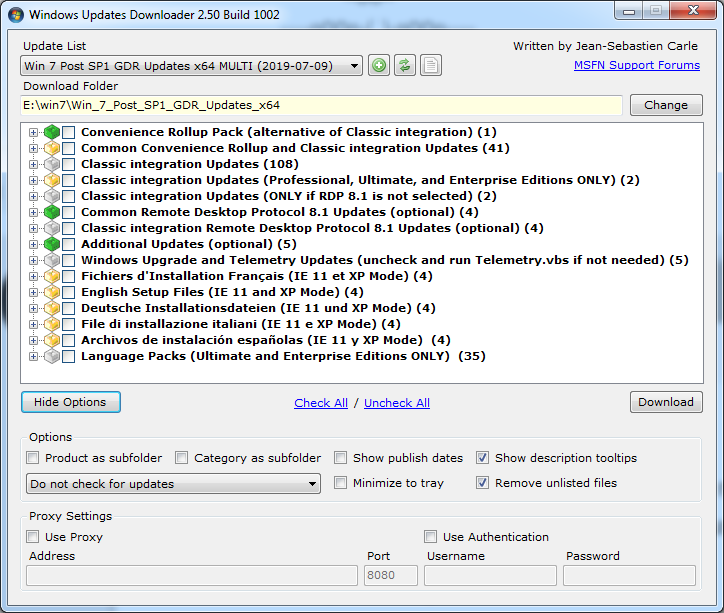
Merci rhahgleuhargh Question: WUD me retélécharge toutes les KB chaque mois malgré qu'il détecte bien qu'elle sont présentes (icônes vertes) et m'efface bien celle devenus inutiles. C'est normal ou il y a un bug ?
-
DNF 4.8 installé en live par-dessus la version précédente, RAS, tout semble bien fonctionner.
-
This post is 4 years old anyway, what di you expect ?
-
It's in Advanced tab. You are in Basic tab.
-
Since Windows 10 have a new version each 6 months I don't even bother to integrate the updates.
-
Version 19.07.01 Don't Sleep 5.45 Process Explorer v16.26 CurrPorts v2.60 DNSQuerySniffer v1.80 HWiNFO v6.08 SIV v5.39 RegScanner v2.35 CPU-Z v1.89.1 Autoruns v13.96 CrystalDiskInfo 8.2.0 AlternateStreamView v1.56
-
I agree. I prefer to use rhahgleuhargh's update list though, less updates to integrate as you can use the convenience rollup.
-
The 48 MB tif is here: https://www.mediafire.com/file/b1r5uia58j73e8f/bliss+600dpi.tif The same compressed with 7zip by myself to save space: https://www.mediafire.com/file/k5gchwsndaoghng/bliss_600dpi.7z The 15 MB png is here: https://archive.org/download/bliss-600dpi/bliss-600dpi.png

