_14e30a.png)
_8126ce.png)

mooms
Global Mods
-
Joined
-
Last visited
Everything posted by mooms
-
.Net 4.5.1 by ricktendo
-
Sur une remarque d'icare, j'ai compilé le batch de nettoyage avec bat to exe converter, il ne pèse plus que 25 Ko maintenant: http://www.mediafire.com/download/yg5zbd2ffd5htpv/WTCleanup.exe
-
Compiled the batch file with bat to exe converter, now the executable is only 25 KB http://www.mediafire.com/download/yg5zbd2ffd5htpv/WTCleanup.exe
-
Merci pour toutes ces remarques, du coup j'ai changé ma commande en RunProgram="%%P:hidcon:cmd /c copy MRT.exe \"%SystemRoot%\\System32\\\"" En effet /Y n'est pas nécessaire, le fichier est écrasé sans confirmation. Pour les doubles \\ à la fin de System32, ça revient à écrire "%SystemRoot%\System32\" plutôt que "%SystemRoot%\System32". Les deux semblent fonctionner. Je vois une logique à ajouter un \ puisqu'on travaille dans ce dossier. Je préfère garder les guillemets autours du chemin, au cas où un utilisateur aurait renommé le dossier Windows avec un nom contenant des espaces. Il y a peu de chances que ça arrive mais tant qu'à faire.... Tu ne peux pas créer une archive 7zip vide donc plutôt que de compliquer la syntaxe en ajoutant la commande dans le fichier de config autant la laisser telle quelle dans un fichier cmd qui en plus sera compressé (bon ici il n'y a qu'une seule ligne...). Bat To Exe est une très bonne idée, j'ai testé et l'exécutable est deux fois plus petit qu'avec 7zip sfx + UPX. Je préfère un exe pour la simplicité, puisqu'on cherche à nettoyer les traces laissées par WinToolkitRunOnce on sait que l'utilisateur l'aura nécessairement utilisé. Supprimer les fichiers temporaires: pourquoi pas mais ça me semble redondant si on utilise un utilitaire du style CCleaner, à vrai dire même les fichiers *.pf inutiles sont supprimés par CCleaner.
-
It depends of the options of the installers. You can always delete them afterwards.
-
1°) Yes. 2°) It's OK. If you want them integrated you can uncheck "Move Know Problems Updates to Silent Installers" in WTK options. (they are perflectly safe to integrate if you're wondering). This option is only available on 1.4.33.3 and newer.
-
Files will be deleted only on next reboot, so you can check logs and save them before deletion.
-
à propos du nettoyage, si quelqu'un a une liste complète des fichiers laissés par Win Tookit je suis preneur. La commande exécutée: REG ADD HKLM\SOFTWARE\Microsoft\Windows\CurrentVersion\RunOnce /V Cleanup /D "CMD /C DEL %WINDIR%\system32\WinToolkit*.* & DEL %WINDIR%\Prefetch\*.pf & RMDIR /S /Q %windir%\WinToolkit"Le SFX: ( à ajouter dans WinToolkitRunOnce) http://www.mediafire.com/download/9c5d6c02vtv6co5/SFX_Cleanup.exe
-
Salut icare, Pour mon leurre MRT, j'utilise cette commande: RunProgram="x86:hidcon:cmd /c copy MRT.exe \"%SystemRoot%\\System32\\\" /y"RunProgram="x64:hidcon:cmd /c copy MRT.exe \"%SystemRoot%\\System32\\\" /y"Bien vu pour le cleanup.
-
If someone has a complete list of leftover files safe to delete, please post them here. I have already found 1 folder (containing drivers.log) and 4 files : "%windir%\WinToolkit" "%windir%\System32\WinToolkitRunOnce.exe" "%windir%\System32\WinToolkitRunOnce.exe.config" "%windir%\System32\WinToolkit_RunOnceLog.txt "%windir%\Prefetch\WINTOOLKITRUNONCE.EXE-*.pf I have created a "cleanup" SFX (to run with withWinToolkitRunOnce) containing a batch file that will delete the files on next reboot (using RunOnce). This way the leftover files & folder are safely removed and you can check log before rebooting. The command executed: REG ADD HKLM\SOFTWARE\Microsoft\Windows\CurrentVersion\RunOnce /V Cleanup /D "CMD /C DEL %WINDIR%\system32\WinToolkit*.* & DEL %WINDIR%\Prefetch\*.pf & RMDIR /S /Q %windir%\WinToolkit"Here is the SFX: http://www.mediafire.com/download/9c5d6c02vtv6co5/SFX_Cleanup.exe
-
Hi trash491, Yes.
-
Salut, 1°) Hormis le pack runonce pas d'ordre particulier sauf pour IE11 (il y a des KB prérequis pour IE11). Le mieux est de l'intégrer en dernier. Si tu utilise DISM il faudra intégrer la version cab, puis le language pack, dico et hyphenation pack, puis enfin la maj cumulative. Quoi que si tu utilise la version US tu ne souhaite peut-être pas intégrer les packs Fr 2°) Pas à ma connaissance. Contrairement aux update packs pour XP qui remplacent les fichiers complètemet, les intégrations depuis Vista conservent une copie des fichiers dans le dossier winsxs.
-
Welcome here LFDD.
-
Oui sans problème. Tu peux créer un fichier batch qui supprimera les traces laissées par Win Toolkit. à éxécuter en dernier bien sûr, ou mieux, au prochain redemarrage. rmdir /s /q "%windir%\WinToolkit"del /f /q "%windir%\System32\WinToolkitRunOnce.exe"del /f /q "%windir%\System32\WinToolkitRunOnce.exe.config"del /f /q "%windir%\System32\WinToolkit_RunOnceLog.txtdel /f /q "%windir%\Prefetch\WINTOOLKITRUNONCE.EXE-*.pfIl y en a peut-être d'autres
-
If you had read the readme file from the maker, you would have know that there are 3 switches for four different install scenarios: The command used if no switch used is uiso.exe /VERYSILENT /SP- /MERGETASKS="!desktopicon,!isodrive"As I said you can edit uiso.cfg to change the default install if you don't want to use any switches for executing the SFX. FYI, VCD handle more formats than UISO virtual drive.
-
Good, it seems you're not a "real newbie" after all ! (or at least you know how to read documentation lol).
-
-
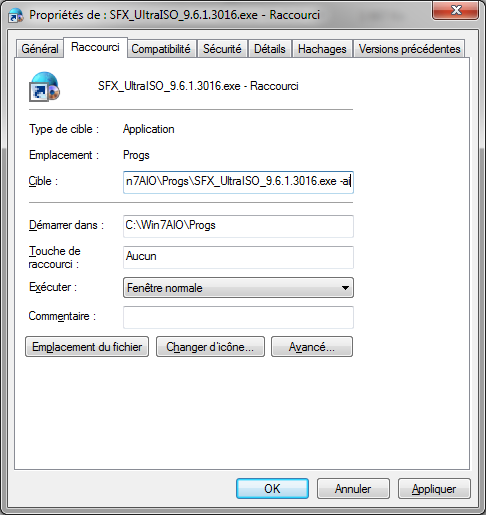
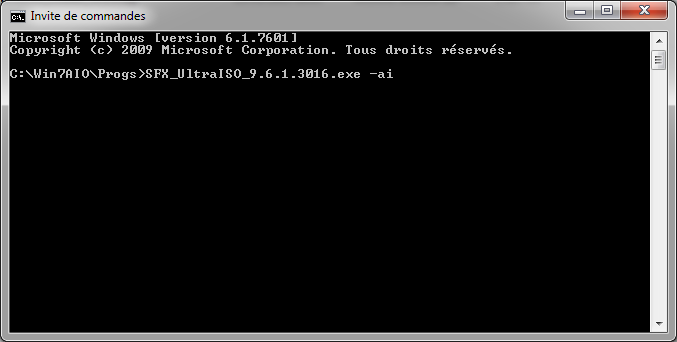
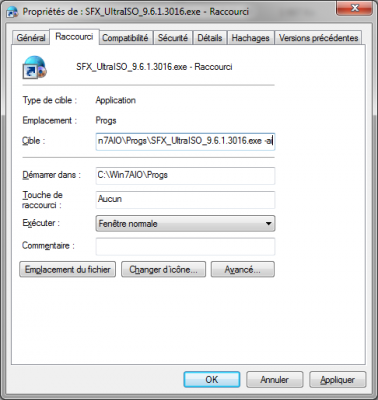
In the command used to execute the SFX. If you want to do it manually (for testing the install) With command prompt (you can also write the command in a text file and change the file extension to *.cmd) Other way: create a shortcut and edit the target to add the switch, then run the shortcut. You can also edit the file uiso.cfg (located in the bin folder of the maker) to make the default install the one you want. (see 7zip sfx help).
-
En travaillant sur un SSD, je tourne autour de 15 min pour une image x86 et 20 min pour une x64. Core i5 et 8Go de RAM aussi.
-
Ceci est un script pour repackager le(s) setup(s) JRE (Java Runtime) dans un SFX 7zip hautement compressé. Version actuelle (pour Java 8u73 et + récent) JAVA-Multi_Maker_3.5.zip MD5: 7716dddd8c576f0d002e6ddeb43d1ac6 SHA-1: 495cf642bf73571bca97179e63ab28c88ca2f5f1 Taille : 3,79 Mo Ancienne version (Pour Java 8u20 jusqu'à 8u72) JAVA-Multi_Maker_3.0.zip MD5: d89eec93311acedd842c6378ed630734 Taille: 1,29 Mo Ancienne version (Pour Java 6, 7, et 8 avant la version 8u20) JAVA-Multi_Maker_1.3_fr.zip MD5: cc9f329d2119fa36067924f54d5ef210 Taille: 372 Ko Mode d'emploi: Versions 3.0 et 3.5: - Extraire le contenu de l'archive dans un dossier. - Lancer le fichier batch. - Le script vous demandera alors de choisir quelle(s) version(s) vous voulez utiliser. - Il téléchargera ensuite automatiquement la ou les versions les plus récentes. (Vous pouvez aussi utiliser le script hors-ligne si vous avez placé le ou les installateurs dans le même dossier, le script utilisera toujours la ou les versions les plus récentes.). Après quelques instants vous obtiendrez un SFX. Notes: L'installation par défaut se fait sans les plugins Web. Les versions précédentes de Java sont automatiquement désinstallées. Il est fortement déconseillé d'installer les plugins navigateurs qui sont vecteurs de failles. L'AddOn pour RVMI/nLite n'est plus créé. Switchs disponibles: avec GUI: -ai Installation silencieuse avec plugins Web. -ai1 Installation silencieuse sans plugins Web. Sans GUI: sans switch: Installation silencieuse sans plugins Web. -ai Installation silencieuse avec plugins Web. Version 1.3: - Extraire le contenu de l'archive dans un dossier - Télécharger l'installateur hors-ligne x86 et/ou x64 de Java et le placer dans le même dossier - Lancer le fichier batch. Après quelques instants vous obtiendrez un AddOn pour RVMI/nLite et un SFX silencieux. Le script créera automatiquement une version x64, x86, ou "Dual" suivant les installateurs placés dans le dossier. Switchs disponibles: -ai Installation silencieuse avec plugins Web. -ai1 Installation silencieuse sans plugins Web. Notes: L'installation par défaut est passive et avec les plugins Web. Les versions précédentes de Java sont automatiquement désinstallées. La recherche de mise à jour et le service Java quick starter sont désactivés.
-
I found the time to work on this ! Version 1.3 of the maker: - Only one script now, it will automatically create x86/x64/dual version of SFX & AddOn based on installer(s) found in the folder. - Replaced 7z.exe/7z.dll with 7za.exe - Changed the install switches for better compatibility with recent Java install. - Slightly changed the install GUI. - Added -ai1 switch to install Java without Web plugins. - The SFX will uninstall previous Java version(s) to avoid problems. If you have any problems with uninstalling previous Java version(s), run JavaRa
-
Oups
-
Done. Thank you Lego.
-
I think we should have an option to never move the KB in silent install, with a warning for novices, this way the option will be set once for all, no risk to forgot to move them back.
-
If the KB are not moved at all there is no need to move them back (and one thing less to remember to do).