
Manage Trusted Sites via Group Policy

Here’s quick tutorial on how to add the site to the Trusted Sites list in Internet Explorer using Group Policy.
Open Group Policy Editor | Create a new GPO and link it to the Computers container where you want the policy to be applied.
Edit the newly created GPO object and navigate to:
Computer Configuration | Administrative Templates | Windows Components | Internet Explorer | Internet Control Panel | Security Page
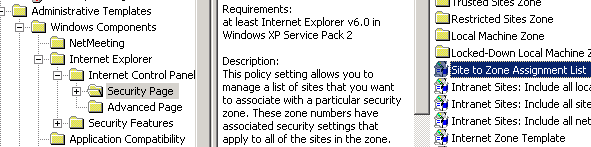
In the right pane double click the ‘Site to Zone Assignment List’ | Click Enabled radio button and click Show.
Now click Add and in the first text box type the location (URL) of the site/page. In the lower text box type 2 as to represents Trusted Sites in Internet Explorer. Number 1 – represents Intranet zone, 3 – Internet zone and 4 – Restricted Sites.
Click OK three times to close open windows.
Close Group Policy Editor and test this setting on one PC.
Note: When you apply this group policy to a PC, user will loose their current settings and won’t be able to add or remove Trusted Sites settings as this option becomes greyed out.













that sounds so good,thanks
Yes, this works, but it also deletes every other Trusted site that might be on a user’s list and then grays out any ability for the end user to add their own sites. Just to be aware.
Yes, that’s true. That’s the case for every setting that you control via Group Policy, but I agree that it should have been mentioned in article.